
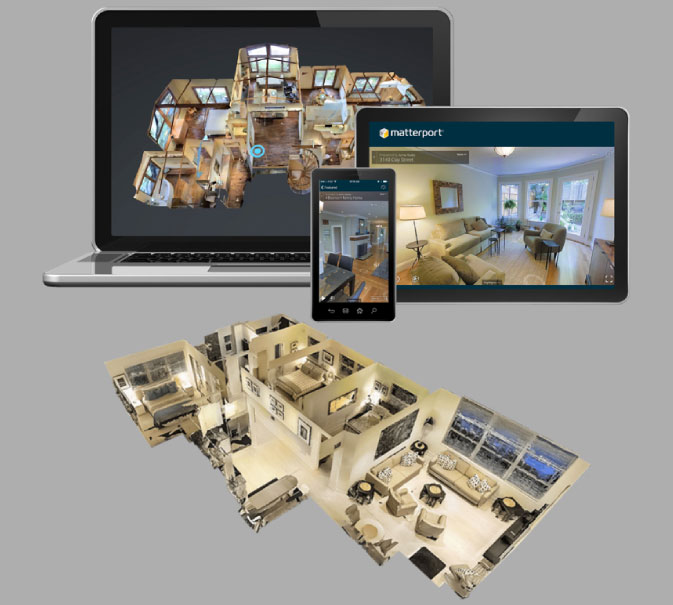
Quick answer: A 3D walkthrough is usually a pre-planned visual journey through a digital property. A flythrough focuses more on exterior movement and cinematic presentation. A virtual tour lets users explore a space interactively, while VR creates an immersive experience that can place the viewer inside a digital environment. The right option depends on your project, audience, marketing goal, and level of interaction required.
For real estate developers, architects, and builders, these terms can sound interchangeable. They are not.
A 3D walkthrough, virtual tour, flythrough, and VR experience differ in how viewers interact with the space. They also differ in production, technology, viewing devices, and marketing applications.
Choosing the right format can make your property presentation more effective. It can also help you avoid paying for technology that your audience may not need.
3D Walkthrough vs Virtual Tour vs Flythrough vs VR
The simplest way to understand the difference is to look at control and immersion.
A 3D walkthrough generally follows a fixed camera path. The viewer watches the property from a planned sequence of viewpoints.
A flythrough is also usually pre-rendered. However, it often emphasizes the building exterior, landscape, master plan, or overall project environment.
A virtual tour provides more control. Users can move between spaces, look around, and explore the property at their own pace.
VR takes immersion further. The user wears a VR headset and experiences the digital environment from a first-person perspective.
In short:
| Format | Viewer Control | Immersion | Typical Use |
| 3D Walkthrough | Low | Medium | Property presentation |
| Flythrough | Low | Medium | Exterior & project marketing |
| Virtual Tour | High | High | Property exploration |
| VR | High | Very high | Immersive sales experience |
The distinction becomes clearer when you understand how each format works.
What Is a 3D Walkthrough?
A 3D walkthrough is an animated video created from a digital 3D model of a property or architectural project.
The camera follows a planned route through the development. It may move from the entrance to the lobby, clubhouse, apartment, bedroom, balcony, garden, or other areas.
The sequence is carefully planned to tell a visual story.
For example, a luxury residential project may begin with an exterior view. The camera then approaches the entrance before moving through the lobby and amenities. It can finally enter an apartment and showcase the interiors.
This approach makes a 3D walkthrough useful before construction is complete.
A professional 3D walkthrough agency can convert architectural plans, design references, materials, lighting concepts, and landscaping details into a cinematic experience.
Weaverbird Technologies offers 3D walkthrough animation as part of its architectural visualization capabilities. Its website describes walkthroughs as cinematic property presentations designed for real estate developers, architects, and builders.
When Should You Choose a 3D Walkthrough?
A walkthrough works well when you want to:
- Present a property before construction
- Launch a real estate project
- Explain a building layout
- Showcase amenities
- Create promotional videos
- Present a project to investors
- Use visuals in sales presentations
- Promote properties on websites and social media
The biggest advantage is storytelling.
You control the camera, sequence, pacing, music, and focus areas. This makes it easier to highlight the strongest features of a development.
What Is a Flythrough?
A flythrough is a cinematic animation that moves through or around an architectural environment.
The term is often used for presentations where the camera travels above, around, or through a building or development.
A flythrough can showcase:
- Building exteriors
- Master plans
- Landscaped areas
- Roads and access points
- Clubhouses
- Towers
- Commercial developments
- Large-scale townships
- Surrounding environments
Unlike an interior-focused walkthrough, a flythrough often emphasizes scale and visual impact.
For example, a township project may benefit from an aerial flythrough showing the complete master plan before the camera moves toward individual buildings.
A flythrough can therefore be an effective tool for launch campaigns and large developments.
3D Walkthrough vs Flythrough
The two formats overlap, but their storytelling styles can differ.
A walkthrough typically takes viewers through spaces. A flythrough often gives greater emphasis to the overall project and exterior environment.
Think of it this way:
Walkthrough = experience the property
Flythrough = see the project from a cinematic perspective
A skilled production team may also combine both techniques in a single animation.
What Is a Virtual Tour?
A virtual tour is an interactive digital experience that allows users to explore a property or environment.
Instead of watching a fixed video from beginning to end, users can decide where they want to look or move.
A virtual tour may include:
- 360-degree views
- Clickable hotspots
- Room-to-room navigation
- Floor selection
- Amenity exploration
- Information panels
- Interactive floor plans
- Property details
- Unit selection
This makes virtual tour services particularly useful for online property marketing.
A prospective buyer can explore an apartment from a website without physically visiting the property.
The experience can also be used on computers, tablets, smartphones, kiosks, or compatible immersive devices.
Weaverbird’s current service offering includes interactive walkthrough experiences where users can navigate a property, explore different areas, and interact with elements of the project.
When Is a Virtual Tour Better?
Consider a virtual tour when your audience needs to explore rather than simply watch.
It can be useful for:
- Residential properties
- Hotels and resorts
- Commercial buildings
- Showrooms
- Offices
- Educational campuses
- Interior design projects
- Museums
- Retail environments
For real estate, the biggest advantage is user control.
The viewer decides what to explore next.
What Is VR in Real Estate Visualization?
Virtual Reality, or VR, creates an immersive digital environment viewed through a VR headset.
Instead of watching a video on a flat screen, users experience the project from a first-person viewpoint.
They can look around naturally and, depending on the system, move through the environment.
VR can therefore create a stronger sense of presence.
For example, a developer could allow a prospective buyer to virtually enter an apartment that is still under construction.
The buyer could look around the living room, inspect the bedroom, experience the balcony view, and explore amenities.
Weaverbird currently offers VR property experiences alongside 3D walkthroughs, interactive walkthroughs, AR experiences, and other visualization solutions.
When Should You Use VR?
VR can be particularly useful when immersion is important.
Consider it for:
- Premium real estate
- Luxury villas
- Large residential developments
- Sales galleries
- Property exhibitions
- Commercial developments
- Architectural presentations
- Investor presentations
- Experience centres
VR can create a memorable sales-office experience because visitors can experience the proposed environment before it exists physically.
Which One Should You Choose?
There is no single format that works for every project.
Your choice should depend on your objective.
Choose a 3D Walkthrough If:
You want a polished video that tells a controlled story.
It is suitable for websites, presentations, social media, YouTube, sales offices, and property launches.
Choose a Flythrough If:
You need to communicate the scale and visual character of a development.
It works particularly well for towers, townships, commercial projects, master plans, and large developments.
Choose a Virtual Tour If:
You want users to explore the property themselves.
It is useful when navigation and interaction are more important than cinematic storytelling.
Choose VR If:
You want maximum immersion.
VR can be particularly effective for premium projects, experience centres, exhibitions, and high-value property presentations.
Can One 3D Model Be Used for All Four?
Yes, in many projects, the same underlying 3D assets can support multiple experiences.
This is one of the biggest advantages of working with a full-service visualization studio.
A project may begin with architectural drawings and design references. The team then develops a detailed 3D environment.
From that environment, different deliverables can potentially be created.
For example:
3D Model
↓
Photorealistic Renders
↓
3D Walkthrough
↓
Flythrough
↓
Interactive Virtual Tour
↓
VR Experience
The exact workflow depends on the project’s assets, software, interaction requirements, and output specifications.
Weaverbird positions itself as a full-service visualization studio covering architectural rendering, walkthrough animation, VR, AR, interactive walkthroughs, flat selectors, digital sales kits, and AI-assisted visualization.
3D Walkthrough vs Virtual Tour vs Flythrough vs VR: Final Comparison
| Feature | 3D Walkthrough | Flythrough | Virtual Tour | VR |
| Fixed camera path | Yes | Usually | No | No |
| User navigation | Limited | Limited | Yes | Yes |
| Cinematic storytelling | Excellent | Excellent | Moderate | Moderate |
| Interior exploration | Excellent | Moderate | Excellent | Excellent |
| Exterior presentation | Excellent | Excellent | Good | Good |
| Mobile friendly | Yes | Yes | Usually | Limited |
| Headset required | No | No | No | Usually |
| Viewer immersion | Medium | Medium | High | Very high |
| Best for social media | Excellent | Excellent | Moderate | Limited |
| Best for sales offices | Excellent | Excellent | Excellent | Excellent |
| Best for online exploration | Good | Good | Excellent | Moderate |
The important point is that these formats are not competitors in every situation.
They can complement each other.
How Real Estate Developers Can Combine These Technologies
A strong real estate marketing campaign can use different visualization formats at different stages.
For example:
Before launch
Use photorealistic renders and a flythrough to establish the project’s visual identity.
During launch
Use a cinematic 3D walkthrough for presentations, websites, social media, and digital campaigns.
During online research
Use a virtual tour so prospective buyers can explore spaces independently.
At the sales office
Use VR to create an immersive experience.
This creates a connected visual journey instead of relying on one format.
How to Choose the Right 3D Visualization Agency
Technology alone does not determine the quality of the final experience.
When evaluating a 3D walkthrough agency or virtual tour agency services, look at the complete production capability.
Check the Portfolio
Look for relevant real estate, architectural, commercial, or hospitality projects.
Check Technical Capability
Ask whether the agency can deliver walkthroughs, interactive experiences, VR, AR, and other formats.
Check Architectural Accuracy
Visual quality should not come at the expense of architectural accuracy.
Check Storytelling
A good animation should guide attention toward the project’s important features.
Check Scalability
Ask whether the same 3D assets can support future marketing requirements.
Check Experience
Look for teams with experience working with developers, architects, builders, and marketing teams.
Weaverbird Technologies states that its team combines visualization, architecture, engineering, software development, media production, and management expertise. Its current website also highlights 25+ team members and more than 20 years of collective experience.
Frequently Asked Questions
- What is the difference between a 3D walkthrough and a virtual tour?
A 3D walkthrough usually follows a predetermined camera path. A virtual tour allows users to navigate and explore the digital property themselves.
- Is a flythrough the same as a 3D walkthrough?
Not exactly. Both can be animated, but a flythrough generally focuses more on exterior movement, project scale, and cinematic presentation.
- Is VR the same as a virtual tour?
No. A virtual tour can work on a standard screen and provide interactive navigation. VR normally uses a headset to create a more immersive first-person experience.
- Which is better for real estate marketing?
It depends on the marketing objective. A walkthrough works well for storytelling, while virtual tours are better for exploration. VR is useful when immersion is the priority.
- Can a 3D walkthrough be viewed on a mobile phone?
Yes. A rendered walkthrough video can generally be distributed through websites, social media, video platforms, and mobile devices.
- Do virtual tours require VR headsets?
No. Many virtual tours work through websites, smartphones, tablets, and computers. Headset-based experiences are a separate VR implementation.
- Can one 3D model be used for a walkthrough and VR?
Often, yes. A suitable 3D environment can potentially be adapted for multiple visualization outputs.
- What is the difference between an interactive walkthrough and a video walkthrough?
A video walkthrough follows a fixed sequence. An interactive walkthrough allows users to control navigation and explore different parts of the property.
- What should I choose for a luxury real estate project?
A combination can work well. Cinematic walkthroughs can support digital marketing, while interactive tours or VR can provide deeper experiences during sales presentations.
- Where can I get 3D walkthrough and virtual tour services?
Look for a visualization studio with experience in architectural visualization, real estate, animation, interactive experiences, and VR. Weaverbird Technologies provides 3D walkthrough, interactive walkthrough, VR, AR, and architectural visualization services.